

Documentation and instructions
Everything we have written for the Faikin Faikout, the Faikin Ninja and the Faikin Oyu: setup, day to day use, troubleshooting and the full MQTT reference. If you are not sure which module or cable you need, start with Find my model and cable.
Before you fit a Faikout: isolate the module from the metal cover
The metal shield or cover inside the indoor unit is connected to earth. If the bare board touches it, the module shorts out and is destroyed the moment power is restored. Do not rely on a small air gap, because refitting the cover can close it. Fit the module in a case, wrap the back of the board in electrical tape or heat-shrink, or mount it outside the metal casing with the two wires run out to it. Outside the casing is the better option anyway, because the metal blocks WiFi.
Watch the full walkthrough
The most thorough Faikin install and setup guide anyone has made: unboxing, opening the indoor unit, plugging the module in, joining it to WiFi and getting it into Home Assistant, start to finish. It is in German, so if you do not speak it, turn on subtitles with the CC button and pick your language under the settings cog, then Subtitles, then Auto-translate. The pictures do most of the work regardless.
Daikin Klimaanlage lokal in Home Assistant einbinden, Faikin-Modul Komplett-Tutorial, by MichasWelt. Not our video, and we are grateful for it.
Faikin Faikout — the plug-in module
- Setup manual — fitting the module and getting it onto your WiFi.
- Faikout Auto and Timer — holding a temperature, daily schedules, and timer troubleshooting.
- MQTT manual — Home Assistant, MQTT control and automation.
- Loopback test — a quick hardware self-test if the module is not talking to the air conditioner.
-
Ducted model number guide — finding the data plate and the control board on a ducted system.
Faikin Ninja — the two-wire bus module
- P1P2 installation guide — fitting the Ninja to a Daikin P1/P2 bus: VRV, Sky Air, ducted and cassette.
- MHI X-Y installation guide — fitting the Ninja to a Mitsubishi Heavy Industries X-Y bus.
- Ninja P1P2 MQTT manual — Home Assistant, ducted zones, full unit diagnostics and automation.
- Faikin Ninja FAQ — which version you need, cables, wall controllers, zones and the two smart home builds.
- Matter pairing guide — pairing and troubleshooting, for the Apple Home + Matter build.
Faikin Oyu — the Daikin Altherma module
- Oyu installation guide — fitting the Oyu to a Daikin Altherma 2 or 3, getting it onto your WiFi and into Home Assistant.
Still stuck?
Email andrew@faikin.au with your indoor unit model number and a photo of the control board, or join the Faikin Australia WhatsApp channel.

How to install a Faikin and cable
- Open the cover of the indoor unit.
- Locate the control board slot (typically used for the factory WiFi module)
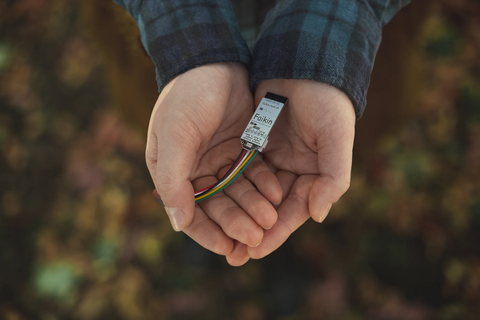
- Plug the Faikin into the slot. (now you've got local web interface control via WiFi, stops offshore connection and cloud services, and removes the need for an app).
- Choose from three operation platforms and install your preference.
- Complete your automated control preference setup using the plaform.
(The module can also interface with compatible BLE temperature sensors as an external reference.)
Tip: Before purchasing, we recommend buyers read carefully the ESP32-Faikin GitHub repo. Check your indoor unit model number appears on the confirmed list of working air-con units. If it doesn't, it'll probably still work, it just hasn't been added to the list yet!
We can look your model up and tell you which cable you'll need.
Our boards are pre-flashed with the latest stable release firmware (not beta) from RevK. We use and recommend RevK's signing key so official OTA firware updates are automatic.
Each Faikin model is individually tested for quality control and reliability to ensure it is plug-in ready.

Specifications
There are seven cable variants to suit the S21, X50, S403.
Available: CN_WIRED sockets.
Brand: Faikin Australia
Compatible brand: Daikin
Sensor Technology: Temperature
Control style: Wi-Fi, MQTT.
Programmability: Programmable
Compatible products: Reverse-cycle, Ductless Mini Split System, Heat Pump, Through-the-wall/window air conditioner.
Features: App control, automatic shut off, built-In WiFi, communicating, daylight savings time-ready, geofencing, outdoor temperature display, remote control, smart connectivity, Wi-Fi, wireless.
Smart home compatibility: Home Assistant.
Smart Home Protocol: Bluetooth/Bluetooth Low Energy (BLE), Proprietary, MQTT.
Condition of items: New, unopened, in original packaging.
Still not sure? Get in touch. We can assist with cable selection and compatibility questions.

Does Faikin work with my AC unit?
Check your AC is on the confirmed list of working units on GitHub.
- Visit the link above.
- Search for your unit model number.
- Note which type of cable is required to work.
Tip: If your unit number does not appear on the list, get in touch.
Customer care support
Got questions? We can:
- Assist you to check your compatibility.
- Help you to make a cable selection.
Tip: Before purchasing, we recommend buyers read carefully the ESP32-Faikin GitHub. Check your unit serial number appears on the confirmed list of working air-con units.
