

Documentazione e istruzioni
Tutto ciò che abbiamo scritto per il Faikin Faikout, il Faikin Ninja e il Faikin Oyu: configurazione, uso quotidiano, risoluzione dei problemi e il riferimento MQTT completo. Se non è sicuro di quale modulo o cavo le serva, inizi da Trova il mio modello e cavo.
Prima di installare un Faikout: isoli il modulo dalla copertura metallica
Lo schermo o la copertura metallica all'interno dell'unità interna è collegata a terra. Se la scheda nuda la tocca, il modulo va in corto e viene distrutto nell'istante in cui l'alimentazione viene ripristinata. Non si affidi a un piccolo spazio d'aria, perché rimontare la copertura può chiuderlo. Installi il modulo in una scatola, avvolga il retro della scheda con nastro isolante o termorestringente, oppure lo monti all'esterno dell'involucro metallico con i due fili portati fuori verso di esso. All'esterno dell'involucro è comunque l'opzione migliore, perché il metallo blocca il WiFi.
Guardi la guida completa
La guida di installazione e configurazione Faikin più completa che sia mai stata realizzata: disimballaggio, apertura dell'unità interna, collegamento del modulo, connessione al WiFi e integrazione in Home Assistant, dall'inizio alla fine. È in tedesco, quindi se non lo parla, attivi i sottotitoli con il pulsante CC e scelga la sua lingua nell'icona delle impostazioni, poi Sottotitoli, poi Traduzione automatica. Le immagini fanno comunque la maggior parte del lavoro.
Daikin Klimaanlage lokal in Home Assistant einbinden, Faikin-Modul Komplett-Tutorial, di MichasWelt. Non è un video nostro, e ne siamo grati.
Faikin Faikout — il modulo a innesto
- Manuale di configurazione — installazione del modulo e connessione al WiFi.
- Faikout Auto and Timer — mantenimento di una temperatura, programmi giornalieri e risoluzione dei problemi del timer.
- Manuale MQTT — Home Assistant, controllo MQTT e automazione.
- Test di loopback — un rapido autotest hardware se il modulo non comunica con il climatizzatore.
-
Guida ai numeri di modello canalizzati — come trovare la targhetta e la scheda di controllo su un sistema canalizzato.
Faikin Ninja — il modulo a bus a due fili
- Guida all'installazione P1P2 — installazione del Ninja su un bus Daikin P1/P2: VRV, Sky Air, canalizzati e a cassetta.
- Guida all'installazione MHI X-Y — installazione del Ninja su un bus Mitsubishi Heavy Industries X-Y.
- Manuale MQTT Ninja P1P2 — Home Assistant, zone canalizzate, diagnostica completa dell'unità e automazione.
- FAQ Faikin Ninja — quale versione le serve, cavi, comandi a parete, zone e le due configurazioni smart home.
- Guida all'abbinamento Matter — abbinamento e risoluzione dei problemi, per la configurazione Apple Home + Matter.
Faikin Oyu — il modulo per Daikin Altherma
- Guida all'installazione Oyu — installazione dell'Oyu su un Daikin Altherma 2 o 3, connessione al WiFi e integrazione in Home Assistant.
Ancora bloccato?
Scriva a andrew@faikin.au indicando il numero di modello della sua unità interna e una foto della scheda di controllo, oppure si unisca al canale WhatsApp Faikin Australia.

Come installare un Faikin e il cavo
- Apri il coperchio dell'unità interna.
- Individua lo slot della scheda di controllo (in genere usato per il modulo WiFi di fabbrica)
- Collega il Faikin nello slot. (ora hai il controllo tramite interfaccia web locale via WiFi, elimini la connessione offshore e i servizi cloud, e non serve più un'app).
- Scegli tra tre piattaforme operative e installa quella che preferisci.
- Completa la configurazione della modalità di controllo automatizzato che preferisci usando la piattaforma.
(Il modulo può anche interfacciarsi con sensori di temperatura BLE compatibili come riferimento esterno.)
Suggerimento: prima di acquistare, consigliamo agli acquirenti di leggere attentamente il repository GitHub di ESP32-Faikin. Verifica che il numero di modello della tua unità interna compaia nell'elenco confermato delle unità di climatizzazione funzionanti. Se non compare, probabilmente funzionerà comunque, semplicemente non è ancora stato aggiunto all'elenco!
Possiamo cercare il tuo modello e dirti di quale cavo avrai bisogno.
Le nostre schede sono pre-flashate con l'ultimo firmware di rilascio stabile (non beta) di RevK. Usiamo e raccomandiamo la chiave di firma di RevK, in modo che gli aggiornamenti firmware OTA ufficiali siano automatici.
Ogni modello Faikin viene testato singolarmente per il controllo di qualità e l'affidabilità, per garantire che sia pronto all'uso non appena collegato.

Specifiche
Sono disponibili sette varianti di cavo per S21, X50, S403.
Disponibile: prese CN_WIRED.
Marca: Faikin Australia
Marca compatibile: Daikin
Tecnologia del sensore: temperatura
Tipo di controllo: Wi-Fi, MQTT.
Programmabilità: programmabile
Prodotti compatibili: a pompa di calore (ciclo inverso), sistema mini split senza condotti, pompa di calore, climatizzatore a parete/finestra.
Funzioni: controllo tramite app, spegnimento automatico, WiFi integrato, comunicante, pronto per l'ora legale, geolocalizzazione, visualizzazione della temperatura esterna, telecomando, connettività smart, Wi-Fi, wireless.
Compatibilità smart home: Home Assistant.
Protocollo smart home: Bluetooth/Bluetooth Low Energy (BLE), proprietario, MQTT.
Condizione degli articoli: nuovo, non aperto, nella confezione originale.
Ancora incerto? Contattaci. Possiamo aiutarti con la scelta del cavo e le domande sulla compatibilità.

Il Faikin funziona con il mio climatizzatore?
Verifica che il tuo climatizzatore sia nell'elenco confermato delle unità funzionanti su GitHub.
- Visita il link qui sopra.
- Cerca il numero di modello della tua unità.
- Prendi nota di quale tipo di cavo serve per farlo funzionare.
Suggerimento: se il numero della tua unità non compare nell'elenco, contattaci.
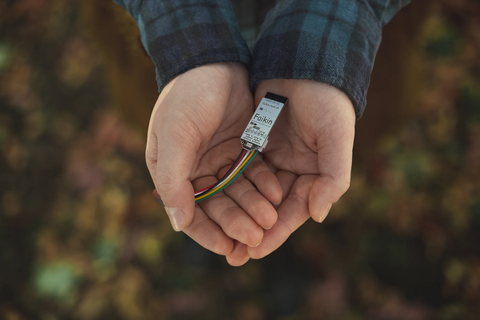
Assistenza clienti
Hai domande? Possiamo:
- Aiutarti a verificare la compatibilità.
- Aiutarti a scegliere il cavo.
Suggerimento: prima di acquistare, consigliamo agli acquirenti di leggere attentamente il GitHub di ESP32-Faikin. Verifica che il numero di serie della tua unità compaia nell'elenco confermato delle unità di climatizzazione funzionanti.
